Magazine :
10 Developer Option Tweaks To Perform On Your Android Phone
#Stay Awake While Charging
For some reason you want your phone screen to stay on while charging and for that, there is an option too. Although, the speed of charging hinders, still you can see your phone screen on throughout the charging session. You can achieve this by heading to Developer Options and checking the box parallel to the option Stay Awake.
#Display CPU Usage Overlay
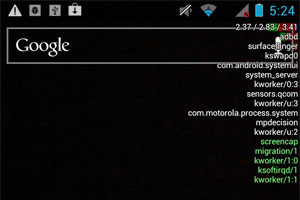 Like keeping track of your CPU usage? No problem, you can track your CPU’s work figures on top of your screen. This overlay the statics on your screen irrespective of apps that are running on the phone. Caution, more the process, less the space of your screen will be utilizable. To make this possible go to developer option and tick to enable Show CPU Usage, then it appears on the right side of the screen.
Read Also:
10 Best Android Gaming Smartphones 2015
Top 10 Call Tracking Android Apps