10 Developer Option Tweaks To Perform On Your Android Phone
#Create Desktop Backup Password
The Desktop backup password option allows you to set a password to encrypt these backups. If you do use such a password, it is important that you remember it or keep a record of it as there will be no way to recover your backups or change the password without it.
To set up the Desktop Backup Password, go to Settings > Developer Options, select Desktop backup password, then follow the on screen instructions and it is better to reset the password for full backup.
#Tweak Animation Settings
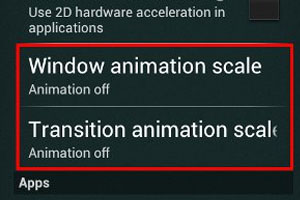 Sometimes Android Phone’s screen transition lags while transiting from one screen to another, in fact it is not lagging in its work, Android overrides the transition speed accordingly. The Developer Options allows users to alter the transition speed manually or disable it completely.
Under Developer Options, tap Window animation scale, Transition animation scale, and Animator duration scale. Regulate the scale for the animation you want, greater the number, slower the animation going to be.
Read Also:
10 Best Android Gaming Smartphones 2015
Top 10 Call Tracking Android Apps